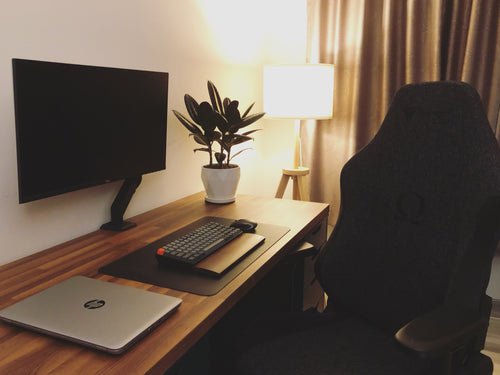
Working from home was supposed to be the dream. No commute, no office politics, lunch from your own fridge. And for many of us it is — except for the part where the laundry hypnotises you, the sofa exerts gravitational pull, and 5pm arrives with mysteriously little to show for it. Figuring out how to be productive working from home isn’t about working longer hours. It’s about building a structure that replaces the one the office used to provide for free.
I’ve worked from home for years, through good phases and disastrous ones. The productive phases all had the same ingredients. Here they are.
How to be more productive working from home: build a real routine
The office gave you a routine without you noticing: alarm, commute, desk, lunch, commute, home. Remove it and most people’s days dissolve. Rebuild it deliberately:
- Keep a consistent start time. Not necessarily 9am — but the same time daily. “I’ll start when I feel like it” is how days evaporate.
- Get dressed properly. You don’t need a suit, but pyjamas-to-laptop keeps your brain in sleep mode. Shower, real clothes, shoes even — the ritual signals “work mode” to your nervous system.
- Have a fake commute. A 15-minute walk before and after work. It creates the psychological boundary the commute used to provide, and the Acas guidance on working from home specifically recommends clear start/end routines for wellbeing.
- Plan tomorrow today. End each workday by writing the top three priorities for tomorrow. You start the morning executing, not deciding — and decision fatigue is the silent killer of WFH productivity.
Your workspace matters more than you think
- One dedicated spot. Even in a small flat — a corner desk, a specific end of the table. When you sit there, you’re working; when you leave, you’re not. The sofa is never the office. Ever.
- Ergonomics aren’t optional. Kitchen chairs destroy backs over months. A decent secondhand office chair (£30–£60 on Facebook Marketplace), a laptop stand or monitor at eye level, and an external keyboard pay for themselves in pain avoided.
- Light and air. Face a window if possible — natural light regulates energy and mood. Open it occasionally; stale air makes afternoons sluggish.
- Noise control. Noise-cancelling headphones for shared houses; background music or café noise (try Coffitivity) for silence-haters. Match the audio to the task: lyrics for admin, instrumental for deep work.
If space is tight, our guide to creating a home office in a spare corner covers compact setups — the principle of one dedicated spot stands regardless of how small the corner is.
Focus systems that survive the home
- Time-blocking. Assign every hour a job — deep work blocks (90 minutes, phone in another room), admin batches, breaks. A calendar full of intentions beats a to-do list full of hopes.
- The two-list method. One list for deep work (writing, analysis, creating), one for shallow (email, admin, calls). Do deep work in your peak hours — for most people, before lunch — and batch the shallow stuff into designated slots. Never “just check email quickly” during deep work; it’s never quick.
- Pomodoro for the resistant. 25 minutes on, 5 off. It sounds gimmicky until you try it on a task you’ve been avoiding for three days. The timer creates urgency; the breaks prevent burnout.
- Single-tab discipline. Close everything unrelated to the current task. Every open tab is an open loop draining attention.
- Phone exile. During focus blocks, the phone lives in another room. Not face-down — another room. This one change is worth more than any productivity app, as our guide to spending less time on your phone explains.
Manage energy, not just time
Eight “productive” hours is a myth — most people get 3–4 hours of genuine deep work daily, office or home. Work with it: schedule demanding tasks for your peak (usually morning), admin for the afternoon slump, and take a real lunch break away from the screen. A 20-minute walk at lunch does more for afternoon output than another coffee. And protect your sleep — the WFH temptation to work late and sleep in destroys the routine that makes everything else work.
Boundaries: with others and yourself
The two classic WFH failures are under-working (distraction) and over-working (never switching off). Both are boundary problems:
- With housemates/family: communicate your hours visibly — a closed door, headphones on, a shared calendar. “I’m working till 5” said once beats ten daily negotiations.
- With yourself: a shutdown ritual — review tomorrow’s priorities, close the laptop, change clothes, leave the workspace. Without it, work bleeds into every evening.
- With your employer: agree expectations explicitly — availability hours, response times, output measures. Ambiguity breeds both slacking and overwork.
Getting this right is half of balancing work and family life — the other half is what you do with the hours you reclaim.
The loneliness factor (and how to fix it)
Nobody warns you about this one: working from home can be lonely, even for introverts. The office provided accidental social contact — the kitchen chat, the shared groan about Mondays — and its absence accumulates. Counter it deliberately: work from a café or co-working space one day a week, schedule lunch with a friend, join a local co-working community, or just take your laptop to the library for a change of scene. Video calls with cameras on beat voice-only for feeling connected. And protect your evenings — the WFH trap is working late because “you’re already home,” then having no social energy left. Finish on time, go out, see humans. Productivity means nothing if the lifestyle around it makes you miserable.
The takeaway
To be more productive working from home: rebuild the routine the office gave you (fixed start, dressed, fake commute), claim one dedicated workspace, time-block your day around deep-work peaks, exile the phone during focus blocks, counter the loneliness deliberately, and end with a real shutdown ritual. Productivity at home isn’t about discipline — it’s about design. Design the day well and the work mostly takes care of itself.