Mastering how do I write good prompts to get useful ai answers is the single highest-leverage AI skill you can learn, because the difference between a vague prompt and a good one is the difference between useless waffle and exactly what you needed. I see people conclude “AI isn’t very good” after asking it lazy questions — which is like concluding a car is slow after driving it in first gear. The model is the same; the input is everything.
Here’s the mental model: an AI assistant is a brilliant, eager intern with no context about your situation and a tendency to guess rather than ask. Good prompting is just good briefing — the same skill as managing that intern well.
How do I write good prompts to get useful AI answers?
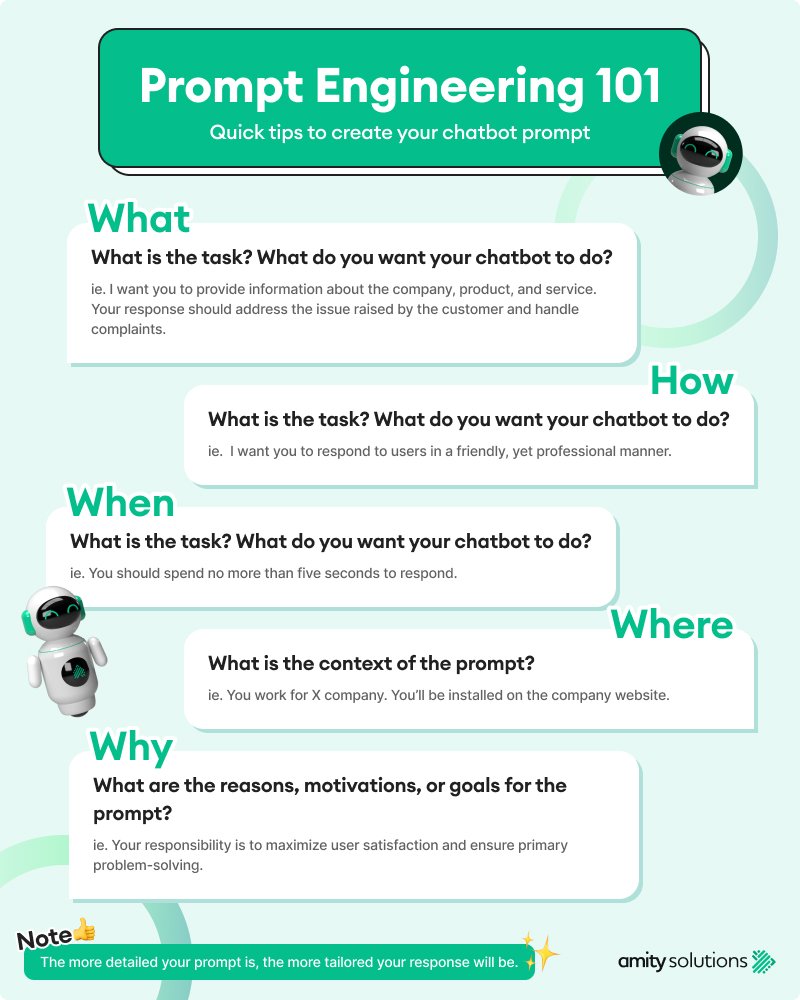
The core formula: context + task + format + constraints
Most bad prompts fail because they only include the task. Compare:
- Weak: “Write about email marketing.”
- Strong: “I’m a freelance garden designer in Bristol with 200 newsletter subscribers, mostly past clients. Write a 150-word re-engagement email for lapsed clients, warm and professional tone, with a clear call to action to book a spring consultation. Include 3 subject line options.”
The strong prompt gives context (who I am, who it’s for), a precise task, the format (150 words, email, 3 subject lines), and constraints (tone, audience, goal). This four-part structure works for almost everything — it’s the foundation behind our guides to CV writing with AI and meal planning with AI.
Seven techniques that level up your results
- Assign a role: “Act as a UK employment lawyer” or “You’re a patient maths tutor” — this tunes the model’s knowledge, tone, and assumptions instantly.
- Show, don’t just tell: give one example of what good looks like. “Here’s a product description I like: [example]. Write three in this style for my candles.”
- Ask for structure explicitly: “Give me: 5 bullet points, then a 100-word summary, then 3 follow-up questions.” Unstructured requests get unstructured answers.
- Iterate conversationally: the first answer is a draft. “Make it shorter”, “more formal”, “now do a version for teenagers” — refinement beats perfectionism in the initial prompt.
- Ask it to ask you: “Before you answer, ask me any clarifying questions you need.” This fixes the guessing problem and dramatically improves complex tasks.
- Request reasoning: “Explain your thinking step by step” for analytical tasks — it surfaces errors you’d otherwise miss.
- Set the audience: “Explain this for a clever 12-year-old” vs “for a fellow professional” produces completely different (and appropriate) answers.
Prompts to save and reuse
Build a personal library of prompts that work. Mine includes: a meeting-notes formatter, a difficult-email drafter (“make this firm but professional”), a weekly planner (“here are my 5 priorities and my calendar — schedule them”), and a devil’s advocate (“argue against my plan so I can stress-test it”). Reusable prompts turn AI from a novelty into infrastructure.
What good prompting can’t fix
Be honest about the limits. No prompt makes AI reliably accurate on facts it doesn’t know — always verify important claims. No prompt makes it a substitute for professional advice on legal, medical, or financial matters (see our piece on AI medical advice risks). And no prompt fixes a fundamentally unclear goal — if you don’t know what you want, the AI can’t know either. Garbage in, garbage out applies to objectives as much as to data.
Advanced prompting: chains, roles, and constraints
Once the basics are second nature, three advanced techniques multiply your results. Prompt chains: break complex tasks into steps, using each output as the next input. “First, list the 5 key arguments for X. Now, for each argument, give the strongest counter-argument. Now, synthesise into a balanced 300-word briefing.” Chained prompting produces dramatically better results than asking for the final product in one go — it’s the difference between one draft and a proper editorial process.
Rich roles: go beyond “act as an expert” to detailed personas: “You are a sceptical UK financial adviser with 20 years’ experience, known for plain speaking. Review my investment plan and tell me what I’m missing.” The more specific the role, the more distinctive and useful the output — generic roles produce generic answers. Hard constraints: creativity loves boundaries. “Explain this in exactly 100 words”, “give me 10 options, each under 8 words”, “no jargon, no bullet points, one paragraph” — constraints force the AI out of its default waffle mode and into precision.
One more pro move: ask for alternatives, not answers. “Give me three different approaches to this problem, with the trade-offs of each” beats “what should I do?” every time — because the decision is yours, and seeing the options with their costs is what good decisions are made of. This applies everywhere from career moves to business strategy. The AI’s job isn’t to decide for you; it’s to expand the option space so your decision is better informed. For authoritative guidance on AI capabilities and limitations, the UK government’s AI policy framework is worth reading.
One more thing: save your best prompts. The prompts that produce brilliant results are assets — save them in a note, a doc, or a dedicated prompt library. Over time you’ll build a personal collection tuned to your needs: the meeting-summariser, the difficult-email drafter, the brainstorming partner. Professionals in every field are now building these libraries, and the compound value is real — each saved prompt saves future time and produces consistently better results than starting from scratch. Your prompt library is the AI-era equivalent of a well-organised toolbox.
Your practical takeaway
For the next week, apply the four-part formula (context + task + format + constraints) to every prompt you write, and iterate at least once on every important answer. Save the prompts that work brilliantly into a note you can reuse. Within days you’ll notice the quality gap — and you’ll understand why two people can use the same AI and get completely different value from it. The skill isn’t technical; it’s communicative. Brief well, get good work.